Train your own Rocket League bot.
The fastest and easiest-to-use public framework for training Rocket League bots. NitroLearn trains a bot on your PC and lets you watch every game it plays in 3D. When it's good, one button turns it into an RLBot bot you can play against.
Coming soonJoin the Vanta Discord to hear when it's outWhy NitroLearn
Other Rocket League bot frameworks just give you the source code and leave everything else up to you. NitroLearn is the fastest and easiest to use: a complete app. Here is the difference at each step.
Speed
Slower. On the same PC, GigaLearn, the fastest of them, trained 3 to 4 times slower than NitroLearn.
The fastest public framework: measured 3.2 to 3.7 times faster than GigaLearn on our test PC, with GigaLearn's usual network size.
Setting up
Install Python, PyTorch and build tools yourself, then dig the arena files out of your game.
One installer brings its own Python, PyTorch and the arena files, then checks your PC and says what to fix.
Training
Edit code and config files, then start it from a terminal.
An app: make a bot in four steps, start and stop it, and change settings that are each explained in plain words.
Rewards
Write reward code and wire it in yourself.
Pick rewards from a list, set their weights and group them in folders. Changes wait until you press Apply.
Watching
Stare at a reward graph, or load replays into another program.
A 3D viewer built in: watch the newest save play live while it trains, with ball cam and car cam set like the game, and see what the bot was thinking.
Is it better?
Guess from the graphs.
Play the new save against an old one and get a plain answer ("clearly better" or "no clear difference"), and test single skills: aerials, saves, shots, landing.
Growing it
Start over for a bigger network or a new mode.
Make a bigger network from your bot without starting over, or start a new bot from one you trained.
Playing it
Write your own RLBot bot around it.
One click makes an RLBot v5 bot. It needs no Python and no graphics card to play.
Updates
Hope your old runs still load.
From version 1.0 on, a bot you train keeps resuming, exporting and playing the same in every later version.
See what it's thinking.
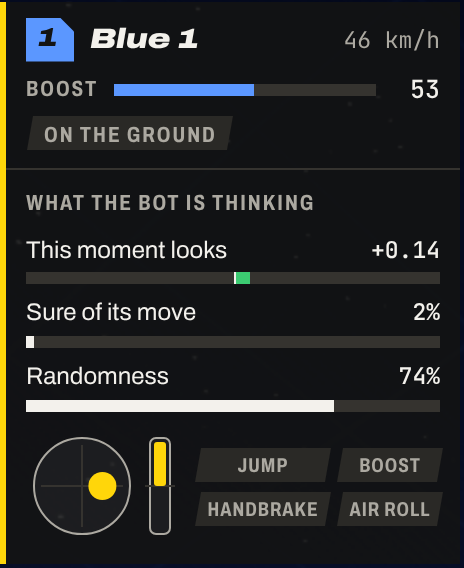
Pick any car in a replay and the viewer shows what the bot thought at that moment: how good it thinks things look, how sure it is of its move, and the exact buttons it pressed.
That's how you find out why it keeps missing the ball, before you spend another night training it.
No terminal needed.
Everything happens in the NitroLearn app. This is its first screen.
 1
2
3
- A checklist walks you through setup: it checks your PC, finds the arena files and asks where RLBot is.
- Each bot gets a row with its race number, steps and saves.
- Training stops and carries on where it left off. Every change waits until you press Apply.
Before you download
- Help
- Stuck, or found a bug? Ask in the Vanta Discord server, where NitroLearn gets its support.
- Windows warning
- Windows may say it "protected your PC", because the installer isn't signed yet. Click More info, then Run anyway.
- Fair play
- Use your bots offline and in RLBot matches only. Never use one online against real players.
- Psyonix and Epic
- NitroLearn isn't made or endorsed by Psyonix or Epic Games. If you work there and want something changed, ping @gamingshorts in this Discord server and we'll sort it out. (Please ping me in the server rather than adding me: I get a ton of friend and message requests, so I won't see yours there.)
- Licence
- Free for non-commercial use under the PolyForm Noncommercial licence 1.0.0. The code is on GitHub.
- Updates
- The app can update itself, or you can run
nitro update.
All featuresEverything you can use to train bots, biggest first, and what's coming next. Open to see it.
- The fastest public trainerA Rust core on the RocketSim simulator, learning on your graphics card.
- A complete appMake, train, change, watch and export bots without a terminal or a line of code.
- One installerBrings its own Python, PyTorch for your graphics card and the arena files, then checks your PC and says how to fix anything wrong.
- A 3D match viewer, built inBroadcast, Ball cam, Car cam, Top and Free cameras. Watch the newest save play live while it trains.
- See what the bot is thinkingHow good each moment looks to it, how sure it is of its move, how random it is, and its controls, with a timeline of goals, touches and spotted mechanics.
- Over 80 rewards, picked from a listEach says what it pays for. Weights, settings, folders and search; switch one off without losing it.
- One click to RLBot v5Makes a bot RLBot can play in real matches. It needs no Python and no graphics card.
- Learn from your own replays firstThe bot copies how the players in your replays play before training starts, even from thousands of replays.
- Play against its past versionsSelf-play against saved earlier versions, with a rating that shows progress.
- Is it better?Play the new save against an old one and get a plain answer, with luck accounted for.
- What each reward really paysLive shares of all the reward paid, with a warning when one reward is being farmed.
- Try rewards before trainingRun a bot with a set of rewards, learning nothing, and see what each would pay.
- Settings in plain wordsEvery setting explained, basics first. Changes wait for Apply, and applying mid-training loses nothing.
- Start from a bot you trainedMake a new bot that starts with everything another one learned.
- Bigger networks without starting overWiden a bot's network and it plays as before, then keeps learning.
- Skill checkSix drills (touches, landing, boost, shots, saves, aerials), each scored against a bar.
- Compare two settingsTrain both on a practice task and find out which learns better, allowing for luck.
- 1v1, 2v2 and 3v3Train any size, or one bot that plays all three.
- A richer view of the gameIn the presets: on the shooting drill, bots scored 88% of shots instead of 53%.
- Attention networks (new)For 2v2 and 3v3: every other car is looked at the same way, whatever its place.
- Charts of what the bots doTouches, time in the air, speed, boost and more, beside the rewards. Weights & Biases if you want it.
- Your own rewardsWrite them in Rust and build them into NitroLearn with one button. Save and load reward sets.
- Train on a rented computerPack a bot into one file, train it on a bigger machine, bring it back.
- Updates that don't break botsFrom version 1.0, a bot keeps resuming, exporting and playing the same in every later version.
- Cameras set like the gameBall cam and car cam with field of view, distance, height, angle and stiffness.
- Share a gameRecord 30 seconds to 5 minutes and pass it on as one page that works offline.
- Search everythingCtrl+K finds bots, pages, settings and actions.
- Runs where you areWindows 10 and 11, and Linux. Works without an NVIDIA card, just slower.
- Commands tooA command and a double-click shortcut for everything, if you prefer typing.
- Nothing listeningNever opens a network port.
In development
Coming in updates after the first release.
- Search In developmentWhile it plays, the bot tries its most likely moves in simulated games about a second ahead, a next-goal predictor trained on real replays scores how each one turns out, and the bot picks the best.
- Multi-model bots In developmentPick several of your bots and let a selector choose which one drives at each moment, with all of them trained together.
- Your own observations and action sets PlannedWrite what the bot sees and which moves it can make, the way you can write your own rewards today.
AcknowledgementsNitroLearn is written from scratch, standing on a lot of other people's work. Open to see who, most used first.
- RocketSimZealanL, VirxEC and contributorslibrary
The simulator every training game runs in, its real-game recordings for starting games from real situations, and the physics constants. Their viewers, RocketSimVis and RLViser, showed what a match viewer should show. (RocketSim builds on Bullet Physics by Erwin Coumans.)
- Rolv-Arild Braaten (Rolv)Rocket Learn with Daniel Downs, Necto, replicar, rlgym-toolscode and ideas
replicar, the library that turns real replays into training games. From Rocket Learn: the rated pool of past versions to play against, how opponents are matched, stat tracking. From Necto: three rewards, observation ideas, and starting most games from real-game situations. One reward from rlgym-tools.
- Kue (Kuenec)GGL Guideideas
Setting how far ahead the bot looks as a half-life in seconds (the guide's formula), scaling rewards when the decision rate changes, and the warning when one reward is being farmed.
- RLGym and rlgym-simLucas Emery, Aech (AechPro) and contributors; rlgym-sim by Aechcode
The 90-action table, seven built-in rewards and two from rlgym-sim (adapted, Apache-2.0), shared game constants, and ideas for what the bot sees.
- GigaLearn and the RLGym-PPO guideZealanLcode and ideas
Masking moves that can't be used, measuring randomness against the number of moves, scaling rewards by how much returns vary. Four rewards from the guide: staying on the ground, speed toward the ball, high touches and long air touches.
- Pulsarits authorsideas
The design of the goal-and-concede setup: a shared trunk, a bigger value side with several value heads, and its learning signals. Also the warning that training every game size at once can stall.
- RLBotRLBot contributorslibrary
The connection between your bot and the game (rust-interface), and RLBot v5 itself, which plays your bot in Rocket League.
- OptiKaiyotechcode and ideas
Two rewards (aerial distance, simple flip reset) and what the bot sees about the ball and the other cars.
- RLMindcorresationideas
Counting what bots do in play (flips, aerials, resets), the viewer's ball height marker, and its choice of cameras.
- rishieissocool's rewardsrishieissocoolcode
Three rewards: cradling the ball, landing recovery and forward speed.
- three.jsthe three.js authorslibrary
Draws the 3D match viewer.
- Lucy-SKGMoschopoulos et al. (paper)ideas
Rewards that only pay when all their parts are met, and the car-ball-goal alignment term.
- MuonKeller Jordanideas
The optimizer used for the value heads, written from its public description.
- Smaller ideasideas
fredrik and aether6837 (one reward each), buta-ppo (shuffling car order), EnvPool (pinning threads), Seer (real-game starts), OpenAI Five (team spirit), Gymnasium (CartPole, for the learning check).
- Tools and librarieslibrary
PyTorch, NumPy, pywebview, Weights & Biases, pyarrow, tomlkit, uv and python-build-standalone (Astral), Inno Setup, and the Archivo and JetBrains Mono fonts.
Full details, with licences and file names, come with NitroLearn in its CREDITS.md file.